


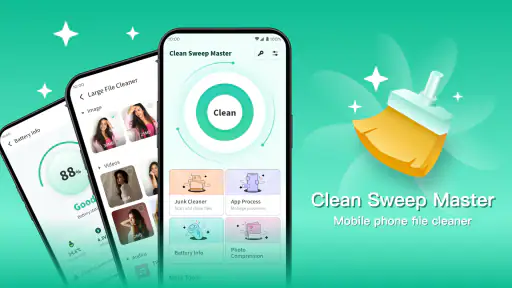
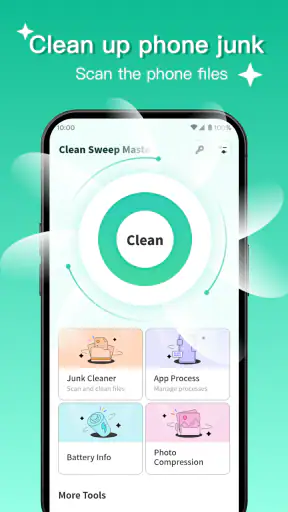
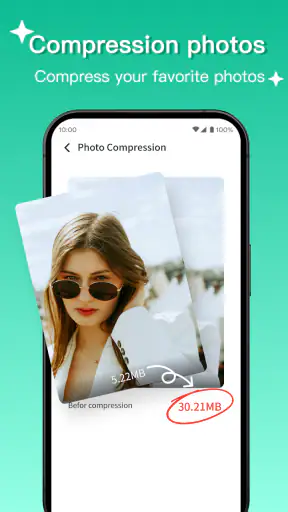
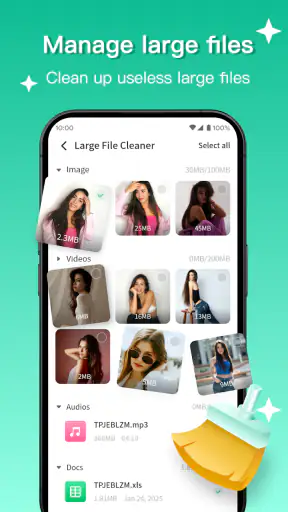
Running out of storage is one of those small phone problems that keeps returning at the worst moment. I have seen it happen when saving a photo, installing an update, or trying to download something for a trip. Clean Sweep Master approaches that recurring annoyance as a productivity task rather than something you should postpone until the phone becomes difficult to use. Its purpose is straightforward: help resolve device-cleaning problems with less searching through scattered settings.
That simplicity is also the main reason I would recommend trying it. This is a free Android app from ZJDevKing, listed for everyone and aimed at ordinary phone maintenance rather than technical users. It belongs in the productivity category because its value is measured in time saved and friction removed, not entertainment. The app has reached over one million installs and holds a 4.2 average from around eighteen thousand ratings, which suggests that its basic idea is useful to a broad audience.
My overall impression is positive, but not unconditional. A cleaning utility can make the process easier, yet it cannot turn a nearly full phone into a device with unlimited space. You still need to review what is safe to remove, especially when photos, downloads, documents, or messaging files are involved. I see this app as a practical starting point for routine cleanup, not as a replacement for sensible storage habits or the phone’s own settings.
Making recurring storage cleanup less annoying
Why the problem keeps coming back
Storage clutter usually grows in small pieces. A few downloaded videos remain after a journey, duplicate images accumulate in chat folders, and temporary files are left behind by apps that are used every day. None of these items feels urgent on its own. The trouble appears later, when the phone has too little room for a system update or a new recording.
The usual alternative is to open Android settings, inspect individual apps, browse file folders, and decide what can go. That route gives you control, but it also demands patience and a reasonable understanding of how storage is organized. For someone who only wants to make room quickly, the process can feel like administrative work. Clean Sweep Master is more appealing when the goal is to reach the useful cleanup choices without repeatedly jumping between unrelated menus.
I would not install it expecting a dramatic transformation after every scan. The real benefit is consistency. If the app helps you notice disposable clutter before it becomes a crisis, it can save more time over several weeks than a single emergency cleanup session. That is the right way to judge this kind of tool: not by flashy claims, but by whether it makes a boring task easier to repeat.
What the first useful setup feels like
The first session should be treated as an inspection rather than a command to delete everything. I would open the app when I have enough time to read the cleanup suggestions, look at the categories it presents, and separate genuinely disposable material from files I may want later. This is especially important on a shared family phone, where one person’s forgotten download may be another person’s only copy.
A sensible first pass is to begin with items whose purpose is obvious and temporary. Old downloads, leftover installation files, and clutter created by repeated browsing are usually easier to judge than personal media. I would leave photographs, recordings, work documents, and offline maps for a slower review. The time saved by a cleaning app disappears quickly if you have to recover something important afterward.
The app is running on Android 7.0 or later, so it is available to people using older supported phones as well as newer devices. That matters because older phones often have less comfortable storage margins and less convenient file-management experiences. At the same time, an older operating system may organize permissions and storage differently from a recent Android release, so the exact path to a cleanup action may feel less uniform from phone to phone.
The current version is 1.1.2. I would keep expectations realistic with a relatively young utility: use it for the task it presents clearly, check every proposed cleanup area, and avoid assuming that a single tool understands the personal importance of every file. The best setup is not the most aggressive one. It is the setup that gives you enough visibility to make quick, informed decisions.
A practical routine for everyday use
One useful workflow is to run a short check before a predictable storage-heavy activity. For example, before leaving for a trip, I would clear disposable clutter, then keep enough free room for photos, videos, and offline content. This is more useful than waiting until the phone displays a warning while you are away from home and relying on a slow connection or limited battery.
Another good moment is before installing a large application or recording a long event. I would use the cleaner to identify easy wins, but I would also check the camera folder and downloads manually. That combination is important: the app can reduce the amount of searching, while manual review protects the files that have personal value.
For a family member who finds Android storage menus confusing, the app may be easier to explain than a tour through system settings. I would show them how to read the cleanup results and ask them to pause before confirming anything involving personal media. This turns the tool into a guided habit rather than a mysterious button that might remove more than expected.
Where it can save the most time
The strongest use case is the person who knows their phone is cluttered but does not know where to begin. Instead of opening several storage screens and guessing which folders matter, they can start in one focused utility. That reduction in mental effort is valuable. Cleaning is rarely difficult because the taps are complicated; it is difficult because the user has to decide what deserves attention.
It can also help people who change phones often or restore content from backups. Those processes can leave behind old downloads and duplicate material. A repeatable cleanup check gives the user a chance to remove obvious leftovers before they become part of the next round of clutter. I would still compare folders carefully, because a duplicate-looking file may have a different resolution, date, or purpose.
Students and mobile workers may appreciate the same approach. A phone used for documents, screenshots, voice notes, and messaging can become untidy without any single large file being responsible. In that situation, a cleaner is useful as a sorting prompt. It encourages a quick review of accumulated material instead of forcing the user to remember every place Android stores it.
Small decisions that make cleanup safer
My first tip is to clean in stages. Start with items that are clearly temporary, then close the app and check whether the phone still behaves as expected. If everything is fine, continue with the next category. This staged approach is slower than blindly accepting every suggestion, but it makes mistakes easier to identify and prevents one rushed decision from affecting many kinds of files at once.
My second tip is to avoid treating a larger number as an automatic reason to delete. A large video may be valuable, while many small files may be harmless. Storage size and personal importance are different things. I would use the app to locate candidates, then judge them by whether I can replace them, whether they are backed up, and whether I will need them offline.
My third tip is to use the tool as a reminder after a busy period. After a holiday, a move, or a long messaging conversation, clutter often arrives in a burst. That is when a quick review has the best return because the files are still recognizable. Months later, the same material may be harder to identify, making cleanup more hesitant and time-consuming.
How it compares with Android’s built-in tools
Android’s own storage controls remain the better choice for users who want the deepest system-level visibility and prefer not to add another utility. Built-in settings are already present, and they are usually the safest place to understand how much space applications, media, and system content occupy. If you enjoy managing folders manually, a dedicated cleaner may feel unnecessary.
Clean Sweep Master makes more sense when the built-in route feels scattered or too technical. Its appeal is convenience: a focused place to begin, a simpler routine, and less time spent remembering which settings page contains which option. That convenience comes with a trade-off. A general-purpose cleaner may not reflect the same detailed context as the operating system or a specialist file manager, so I would not use it as the only source of judgment for important content.
Cloud photo tools and dedicated file managers can be better alternatives in specific situations. A cloud service is more appropriate when the real problem is preserving photos while freeing local space. A file manager is better when you need to rename, move, archive, or inspect folders in detail. Clean Sweep Master is the middle option: more approachable than manual browsing, but not a full replacement for backup and file organization.
What may create friction
The biggest limitation is inherent to the category. Cleaning suggestions are only useful when the user understands what they represent. No utility can reliably know that an old-looking download is unimportant to you, or that a duplicate image is the one you intended to keep. That means the app reduces navigation, but it does not remove responsibility.
There is also a difference between freeing space and making a phone feel faster. Removing disposable clutter may solve an installation or recording problem, but it should not be treated as a guaranteed cure for every performance complaint. If an older phone is slow because of demanding applications, battery wear, or limited hardware, cleaning alone may not change the experience much.
I would also skip this app if you already have a storage routine that works well through Android settings and a trusted file manager. Adding another layer can create confusion rather than convenience. Likewise, people who want automated, aggressive deletion should be cautious; I prefer a tool that supports review and deliberate choices over one that encourages speed at the expense of confidence.
Who should use it and who should look elsewhere
Clean Sweep Master is a good fit for Android users who repeatedly encounter full-storage warnings, dislike digging through menus, or want a simple prompt for routine maintenance. It is particularly suitable for people with older supported devices, busy phones filled with downloads and media, and family members who need a less intimidating starting point.
I would point power users toward Android’s storage controls or a capable file manager when they need exact folder-level control. I would point photo-heavy users toward a backup-and-archive workflow when their main goal is preserving memories rather than removing clutter. The app earns its place when convenience is the problem being solved.
The listing identifies it as free, which removes the main barrier to testing it for a personal cleanup routine. It is also marked for everyone, making its intended audience broad rather than limited to technical users. Still, free access does not change the need to review deletion choices carefully. The safest habit is to use the app for discovery and confirmation, not to hand over every storage decision without looking.
My final view after weighing time saved against control
I like Clean Sweep Master because it addresses an ordinary problem in a practical way: the phone becomes cluttered, and the user needs a manageable place to start. Its value is not that cleaning becomes magical. Its value is that a task people often avoid can become a short, repeatable part of phone maintenance.
The app is most convincing when I use it before storage becomes urgent, especially after a period of heavy downloading, messaging, photography, or offline use. It can shorten the path from “something is taking up space” to “I know which areas deserve a look.” That is meaningful productivity for a small utility.
My recommendation comes with one rule: use the convenience, but keep the final decision in your hands. If you want a focused free cleaner for Android 7.0 and newer, it is worth trying. If you need detailed file management, dependable photo archiving, or a guaranteed performance boost, another tool or the built-in system controls will serve you better. For everyday storage housekeeping, however, Clean Sweep Master offers a sensible balance between speed and caution.


